Saturday, January 30, 2016

VFX Best of the Best: Resident Evil 4

 When Resident Evil 4 released in 2005, it was quickly recognized as a revolution in horror gaming. It was a refreshing new take on the franchise, basically defined over the shoulder shooting for the rest of that generation, and is widely considered one of the best horror games of all time. The game was also a graphical powerhouse, pushing the Gamecube well past what anyone could have expected at the time.


 One of the most impressive aspects of RE4 was it's fantastic VFX design. Many of the fx still hold up when compared to more modern games, even later iterations of it's own franchise. I remember when I first saw RE4, I was blown away by how real the fire looked.


 To this day, I still can't think of many games that can beat RE4 when it comes to fire. They've got all sorts of high-quality animated flame textures that they employ in their fx, most of them sourced from real fire footage. The sheer number of different fire animations impresses me, since it seems like they've got a different texture for each individual fire effect. They've got different ones for bonfires, for fireplaces, torches, incendiaries, lamps, you name it. It gives their fire good variety and a very natural look to it all.


You can see some more of their exceptional fire effects during this fight.

 Another thing RE4 handles exceptionally well is blood. Blood is tough to get right, and a lot of games still have trouble rendering it effectively. It's either too shiny, too viscous, or simply too much. RE4 hit a sweet spot with it's blood fx, where there's enough to look gruesome, but it's subdued enough to avoid looking cartoonish.
 Where the blood shines for me is in the designs of the particle systems. There are a lot of subtle intricacies in order to help the blood feel more tangible.
Note how the blood from the shotgun blast falls and splatters on the ground.
 Let's take a look at one of RE4's most infamous scenes: the chainsaw death.


It's over in an instant, but there's a surprising amount of detail put into the effect.

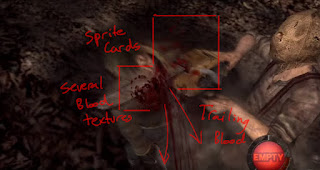
 First you've got the initial grind of the chainsaw against Leon's neck. They've got a few sprite cards filling the area between the chainsaw and Leon, but they've also got trails of blood flying away, meant to emulate the spray of blood being carried across the chainsaw's teeth.

Like so
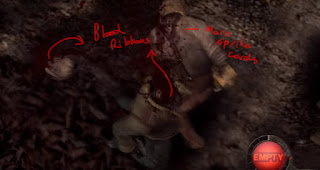
Next up, once Leon's head comes off:


 A neat little detail they added was ribbon particles spawning from both ends of Leon's neck to make it look like a stream of blood flowing as his body and head collapses.

 Once the body hits the ground, there's a nice big splatter that spawns at his neck stump

 And lastly right before the "You Are Dead" screen shows up, you see blood pooling out from Leon's neck.
 A whole lot of elements just for one sequence! All of which combine to make for one horrifying scene. I still feel like RE4's chainsaw death is one of the most effectively disturbing sequences in a video game, and much of that can be attributed to the detailed design of the VFX.

Friday, January 29, 2016

Been a while

Been busy last couple months, kinda forgot about this. Though I feel like I could update it some more, still got stuff to say and things to show!

Here's some of the art I've done over the past while:

This was for a little April fools post we did for Insurgency. "Now announcing, Insurgen-Z"

This is a cop for a little fiction I'm concocting. Tried experimenting with some different painting techniques.

And this is a quick mockup for a new level tileset in Due Process, the Drug Factory:

Tuesday, August 12, 2014

Insurgency - Environment FX Reel

Some before and afters of the levels in Insurgency, showing some of the effects I did for them.


Thursday, July 24, 2014

More Ins Art

New header image I made for Insurgency for our next update. Had some fun doing this one, and I'm starting to speed up my process.

Material definition is hard.

Tuesday, June 17, 2014

Due Process - Interior Concept Art

Starting to work out what Due Process is gonna look like. This is only one environment set, we're eventually planning on more that take places in areas like apartment complexes, inside ships, etc etc.

Friday, June 6, 2014

Due Process Gameplay

Here's some gameplay from the shooter I'm working on with my friends, and an example of the pixelated particle effects I've been working on. Obviously the art is very VERY placeholder, I'm working on concept art for how the game's going to look.


Wednesday, April 9, 2014

Retro FX

I'm starting up a new project with a couple friends. A tactical multiplayer room breaching game. We're planning on going with a pseudo-retro style, where high detail models have retro pixelated textures. This presents a really interesting and fun challenge for me; How do I make detailed particle effects with a retro pixelated stylization to them?

I've always been a huge fan of arcade game fx. I often reference them as much as I reference modern games, there's a lot you can learn from them. Games like Metal Slug or Raiden had some dazzlingly detailed visuals.


I've only just started establishing the style I want to work in, but I'm already having a lot of fun coming up with interesting ways of making pixelated effects. These are some textures that could potentially be used for a futuristic muzzle flash.


I can't wait until we get further in development. VFX will be a large part of the game so I've got a lot of fun work ahead of me.

Monday, April 7, 2014

VFX Tips - Making Smoke Textures

I was playing Space Marine the other day, and I was interested in the way they handle their smoke textures. The textures aren't animated as far as I can tell, and manage to get a lot of mileage without needing too high of a particle count.


I decided to try painting a smoke texture similar to the ones they used.

First I painted a brush to use to make the body of the smoke.


I made it out of a gradient circle brush and the smudge tool. I set it to use a bit of scatter, random angle and size, and a dual brush with a gradient circle to help unify the edges while painting.

I painted the general shape of the smoke with the brush.

I always like the paint on a midtone color because it gives you a better idea of what it could look like ingame. I then dropped the cloud I painted down to a dark tone.

They layed on highlights using a soft brush.
I then added a bit of darker value to help separate the cloud shapes more.
Then added a brighter highlight to better define the edges.
I slightly overlayed some photos of real smoke to add a bit more internal noise, and made the whole thing a slight tone of yellow (giving a texture some internal color differences can help your effects not look so uniform when colorized)


Now perhaps the most important thing to consider when making a smoke texture is the alpha map. You want to break up your alpha map as much as you can. Give it a lot of gaps and turbulence in the texture. You want to do this because when you have a particle fade out in a particle system, less of the detail is defined by the diffuse texture and is instead defined by the alpha texture, so if your alpha is a big opaque blob, that's what it's going to look like at a low alpha.

Good alpha map...
...Gives good results!


Bad alpha map...

... Gives bad results :(

Friday, April 4, 2014

Insurgency Promo Artwork

I'm still trying to hone my skills as an artist. I love looking at concept art from games or movies, it always motivates me to improve. But I was thrown from the frying pan and into the fire during my work for Insurgency. I signed on to do VFX work, as well as concept art for their next project. Keyword being concept art. Not marketing art. However, when the time came to release I was asked to create the image that would go up on the Steam front page. A daunting task to say the least.

Nevertheless, I accepted. It was a great opportunity to see what I've learned so far and how far I can push my limits. The results were better than I could have hoped.


The piece got a lot of praise from the team and looked great on Steam. My anxiety turned into excitement after seeing what I was capable of. So when they asked me to do art for their latest content update I approached the job with a newfound vigor. Hoping to see if I could do even better than the last piece.


Doing these two pieces was a great learning opportunity, and have made me feel even more exited about what I can learn to do in the future.

Tuesday, February 18, 2014

Mech Pilot


I've been bouncing a few ideas for games around in my head, and I wanted to draw a character from one of them. This guy's a mech driving mercenary in search of the men who betrayed him. I wanted to try doing a drawing using Ctrl+Z as little as possible. Turned out to be a really fun challenge, as it forced me to loosen up a lot more.

Monday, February 17, 2014

Fluid Simulators and the Future of VFX

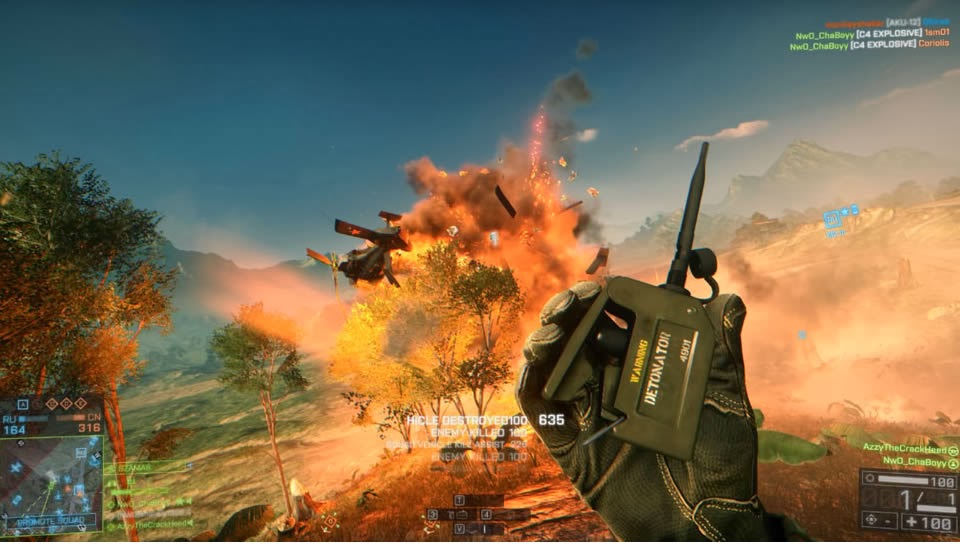
 With the reveal of the new generation of game consoles, we've been getting treated to all sorts of incredible new graphics technology. Higher resolution textures, powerful lighting systems, intricate shaders, etc etc. Of course what I was looking out for was improved FX technology and what the new systems would be capable of. I'm sure many of you saw that extravagant looking explosion during the reveal of Battlefield 4:


 It's an impressive effect for sure. When I first saw it, my first inclination was that it was bullshot footage, prerendered to wow the audience. But as soon as other footage cropped up I understood exactly how they did it.


 The entire explosion is one big 2D facade. A flat plane with an animation rendered out from a fluid simulation program. It's more or less a high res version of the explosion sprites from Duke Nukem.
 Now I typically wouldn't have too much of a problem with this. Several other games have used similar techniques to achieve impressive visuals for cheap.


 However, my issue with BF4's usage of the technique is the fact that if you get too close to it, you start to see the man behind the curtain. If it were something off in the background, or something that you could only ever look at from one perspective, then it'd work great. But like I showed in that video above, if you walk right up to it the effect is completely ruined. They are attempting to use prerendered simulations in places where traditional particle systems should normally be used.


With the rise of fluid simulators, and the ability to render out spectacular looking effects, it feels like people are trying to use these animations to do all the work for them.
 For those who don't know, a fluid simulator is a program like FumeFX, Maya Fluids, or PhoenixFD, that is able to create a 3D simulation of fluid dynamics, meaning that you can use them to create fairly accurate simulations of fire, smoke, and water. You typically see 3D simulated effects in movies, where doing the effect practically would be too expensive.

 Plenty of fluid sim action in this reel.

 So the question is, now that we have fluid sim technology, why should you bother creating a complex particle system when you can render out a 2D animation of something and have that be the entire effect?
 Because relying on a fluid sim means that you're taking away a lot of your own style from your effects. When you have to come up with your own way to animated fire, smoke, dust, debris, you inject a lot of your own personal vision into how it looks. But if you let the computer simulate it all for you, it winds up feeling soulless and homogenized.

Compare the fire graphics of Far Cry 2 and Far Cry 3. FC3 used fluid simmed textures for the majority of it's effects. Personally I preferred FC2's fire, as it feels like the the action is more in the way the particles were actually moving, rather than just relying on the animation of the texture.

My other issue with fluid sims is that they tend to feel the same, and they never look quite right.

 Two different reels by two different people, but since they both used the same fluid sim, it all winds up looking samey.

Fluid sim FX have a certain look to them. A look that we've come to learn through their usage in movies. When we see CGI in movies, it typically sticks out like a sore thumb, so our brain associates the look of it with 'fakeness'. This carries over to when we see that same look in videogames. Even though the rest of the game environment is fake as well, seeing the familiar look of fluid simmed effects triggers the same fakeness vibe we get when seeing them in movies.

 So I know I've been harping on fluid simulators this entire post, so I must think they're awful things that shouldn't ever be used.
 Well not exactly. Fluid simulators CAN be very useful tools, if used in moderation. If you can mix together fluid simmed textures along with more traditiona techniques, you can give your effects much more naturalistic motion.


 My only concern for the future is if we ever make fluid simulations that run in real time. If that becomes mainstream it may mean the phasing out of traditional sprite-based particle effects. What makes VFX so varied and unique in games is the limitations imposed on the FX artists. If we remove those limitations and replace it with systems that create the art for you, we could lose a lot of what makes VFX so great.

Saturday, February 15, 2014

VFX Tips - The 3 Rules of VFX

 VFX is all about trickery. Fooling people into thinking that a bunch of 2D flat images are a 3D volumetric effect. Replicating accurate fluid physics with 2D sprites is very difficult, so more often than not you'll be making an abstracted representation of an explosion, rather than something that looks accurate to the real world. This freedom from trying to make it look real is both the best and worst thing about VFX, because it means that you are in complete control of how you want your effects to look, but it also means you're working from the ground up, and you have to try and come up with your own way of representing fire and smoke that's within the limitations of your game engine.
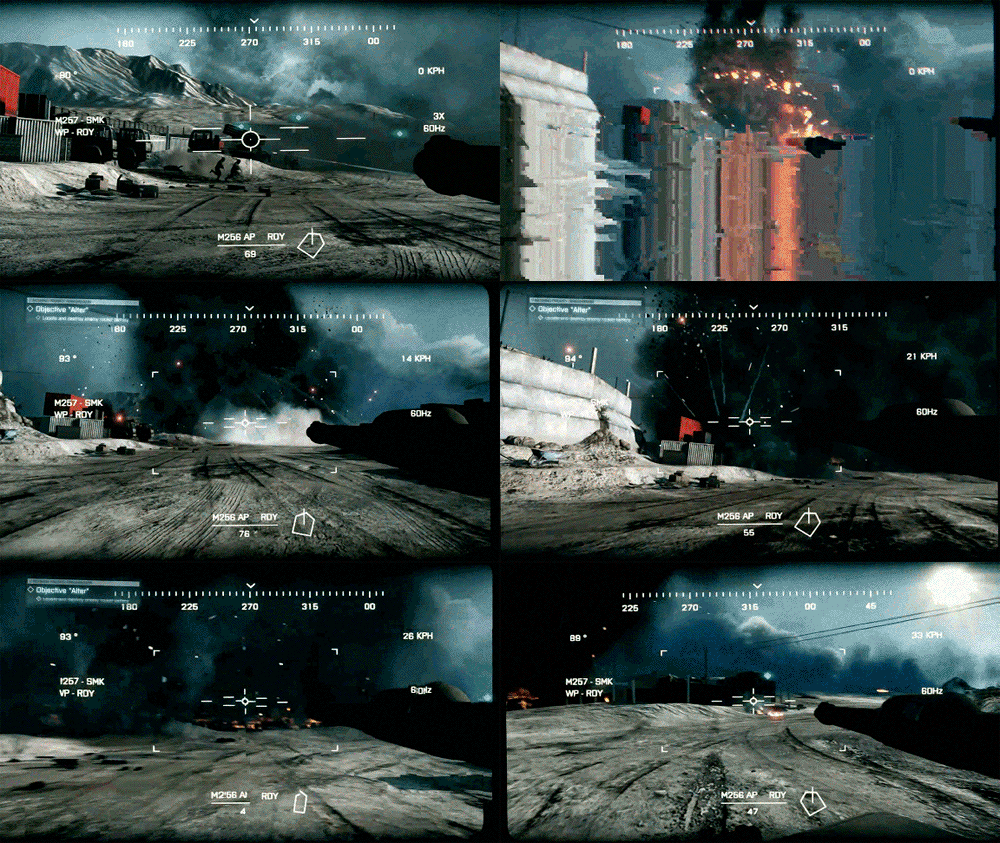
Does it look real? Not particularly. Does it look cool? Hell yea!
 While there is no one way to do anything in FX, I've come up with the 3 most important aspects of what defines how an effect looks and feels.

-Volume
-Texture
-Motion

If you have a solid grasp on all three of these concepts, then you'll be able to make spectacular looking FX.

Volume:
 As I said, unless your engine supports fully 3D fluid simulation, all you have to work with are 2D planes to create your FX. So you need to trick people into thinking that the effect is still volumetric. There have been some technical advancements to help you achieve that.
 Since particles are 2D planes, when they intersect with objects they would create a very obvious line, ruining the effect. It's possible to hide the line by creating many more particles, but that's inefficient and not at all an ideal solution, hence why Soft Particles were created.
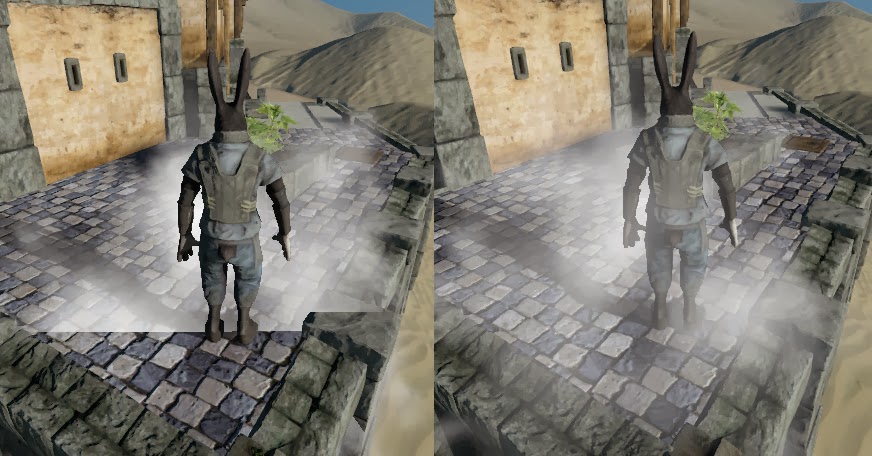
With and without soft particles.
 Soft particles work by blurring that harsh edge where the particle intersects with an object, making it look more like a volumetric cloud than a flat image. The effect still has it's limitations though. Trying to soften the edge of a very large particle may reveal the edge.
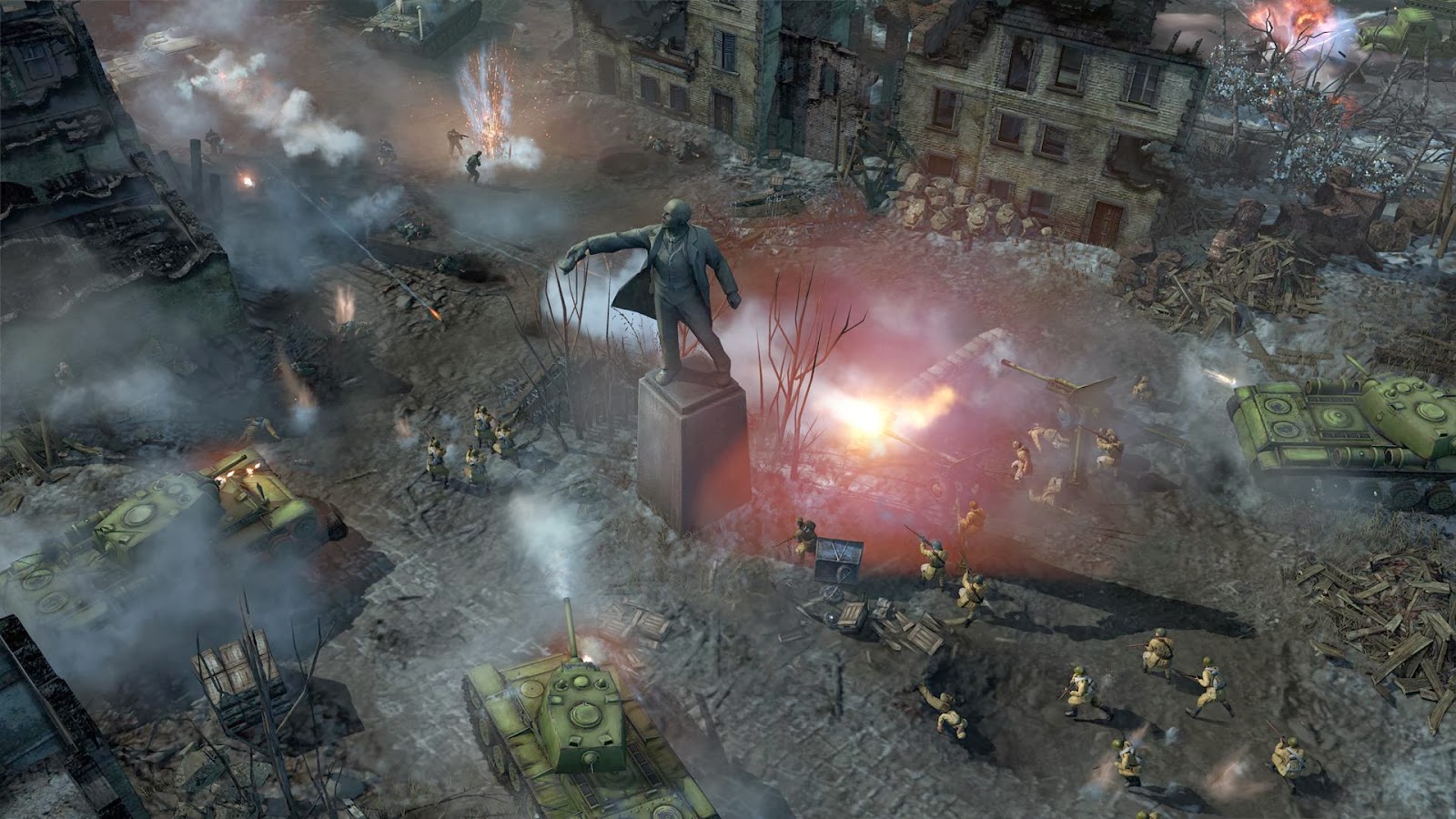
Note how the pink glow from the explosion can be seen intersecting with the statue of Lenin.
 Another technical advancement is Particle Illumination, or particle shadows. This effect applies a gradient of shadow across the particle plane, making it look as though it is being illuminated by the local light source.

Shadows and lighting can really give your effect a sense of depth. As you can see in the Battlefield 3 image at the top of this post, the light of the explosions shining through the smoke makes it feel real and tangible.


 But to achieve volume requires more than just technical tricks. Volume is all about balancing your particle count to achieve the greatest sense of depth while retaining the design and look that you want to achieve. Using a ton of particles gives a lot of volume, but it can become cluttered and you'll lose control  over what the particles are doing.
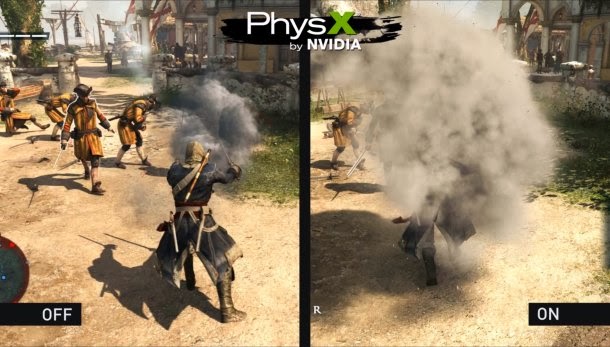
Turns out you can have too much of a good thing.

Using fewer particles that have a more specifically designed texture is the best way of achieving volume.


Texture:
 Now when I say Texture, I'm not referring to the actual textures you are using in your particle (though those ARE an aspect of the particle's overall texture) I'm talking about the level of visual noise and fine detail in the effect. 
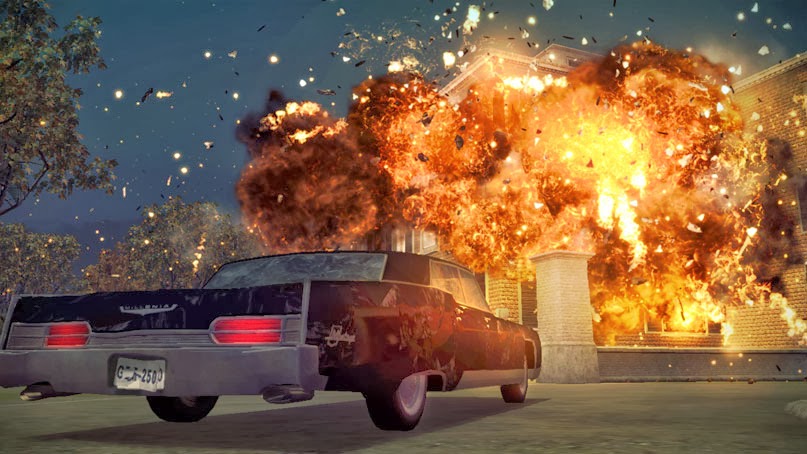
An effect with a HIGH amount of texture.
An effect with a LOW amount of texture
Texture manifests itself from the quality of the materials you're using, as well as how intricate of detail you get into when creating the effect. Highly textured effects tend to look more crisp and intricate, while low detail effects feel more generalized and vague. High detail is about giving you a visual show, and low detail is more about giving the feeling of the effect.
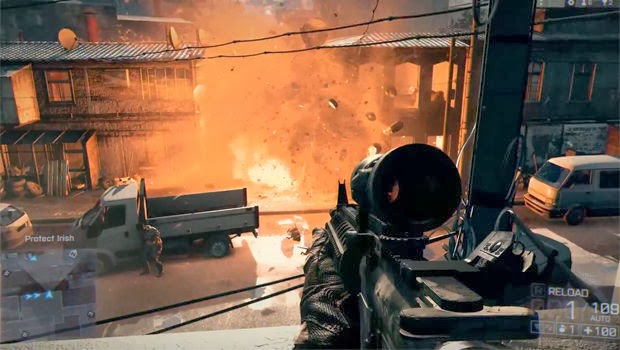
I can tell there's an explosion going off, but I can't tell what it looks like.
Having intricate high quality particle materials will give you more visual texture, but it will also make the material more situational. You wouldn't be able to use it for as much as a vaguer more generalized material. A more simplistic texture could be used for all kinds of things. Games like Grand Theft Auto 4 use the same texture for the bursts of flame from an explosion as the smoke that follows, all they have to do is simply color it bright orange.


 A game like Company of Heroes, on the other hand, has highly specialized particle textures. They have multiple different types of bursts of sparks, jets of smoke, thick debris, thin debris, etc etc etc. It's more work, but it allows them to really sculpt out the look of the effect.
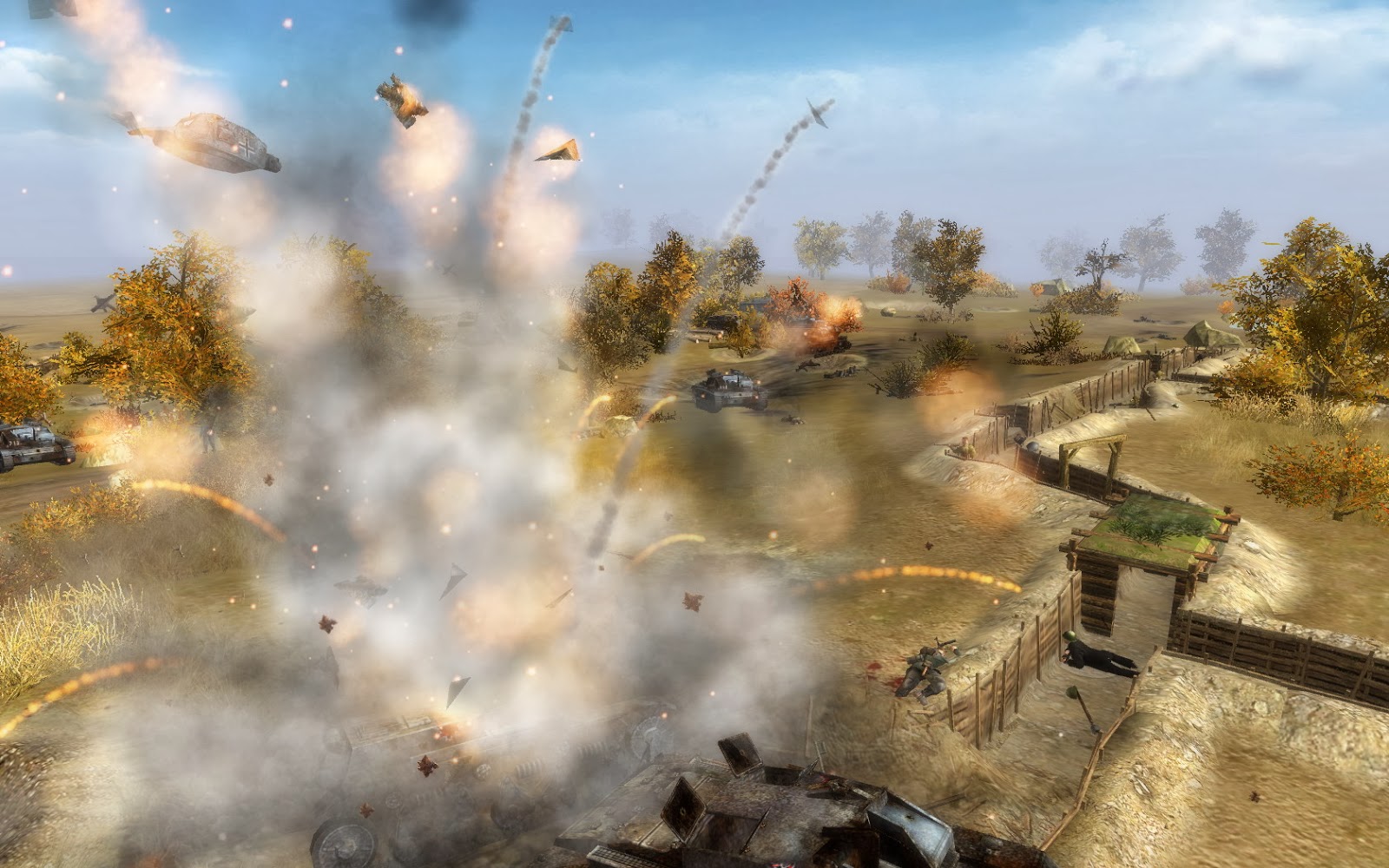
Men of War. This game came out in 2009?!
 Like volume, it's also possible to have too much texture. Throwing too many sharp elements into an effect can make it look messy and unpleasant.


Motion:
 Motion is all about how the different elements of your effect move. Motion is the biggest contributing factor to how an effect 'feels'. You can make things feel impactful, flowing, crunchy, pillowy, etc. Feel is a very vague concept, but there is no question that it exists, and trying to get control over how you want something to feel is the biggest challenge in VFX.


Offsetting elements by a fraction of a second can be the difference between a weak effect and a powerful one. Notice in the image above how the first element of the effect is a large vertical flame, then the shockwave, and only after all that does the dust cloud kick up. It doesn't happen all at once. This progression of elements in the effect makes it really feel like the explosion is ripping the ground up from the earth.
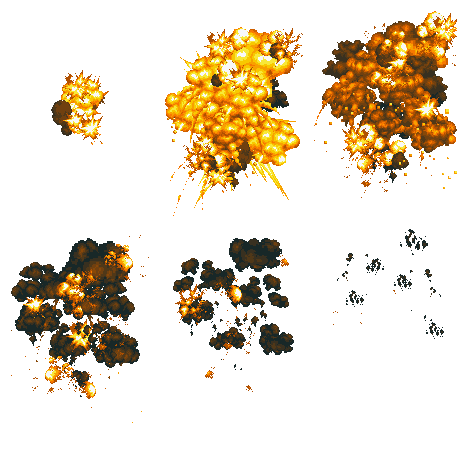
Making an effect expand quickly, then retract helps add punch.
 You also want to have a variety of motions within the effect. You may want it to start with a punch, the move to something more flowy. Mix billowing smoke with scuttling sparks. Have some effects plume outward while others flash and retract. Giving your effect a range of motion will make it feel more like a combination of the different elements that created it.


Bad motion is instantly recognized. It will make your effect feel bland, awkward, or unfitting. Spawning everything at the same time can make it feel abrupt. Not giving the effects a unified motion will make it feel like an obvious simulation. People won't become interested with the action onscreen if your motion is boring.
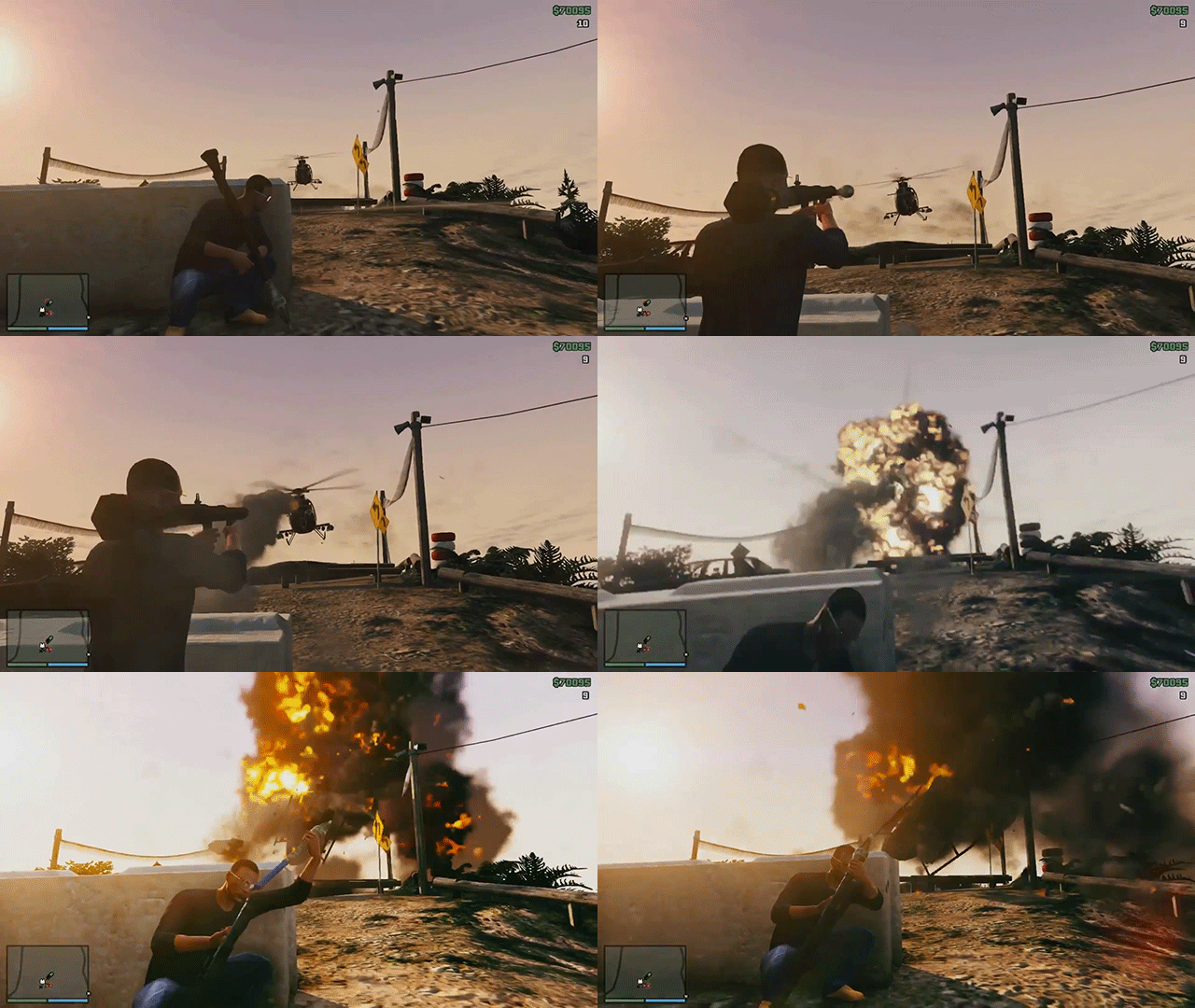
It's supposed to be an explosion, but it just doesn't feel like one.
Volume, Texture, and Motion are what set spectacular effects above bland ones. If you can master these concepts, learn to balance them based on your personal preference and keep them within the limitations of your engine, you'll be able to create amazing looking particle effects.